Download Docsets
After installing Zeal, go to Tools ⟶ Docsets to browse and download docsets.
Search Filters
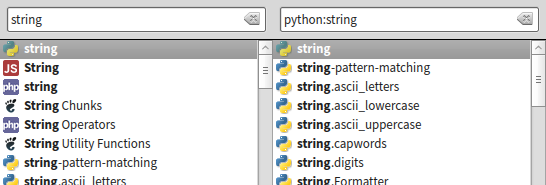
You can limit search results to a specific docset, or a set of docsets.
The docset filter and the search query are delimited by a colon character (:).
Examples:
stringwill search all docsets forstringpython:stringwill search only docsets related to Python forstring
Keyboard Shortcuts
| Command | Shortcut |
|---|---|
| Focus Search Bar | Ctrl+K or Ctrl+L |
| Find in Page | Ctrl+F or / |
| New Tab | Ctrl+T |
| Duplicate Tab | Ctrl+Alt+T |
| Close Tab | Ctrl+W (also Ctrl+F4 on Windows) |
| Select Tab 1 to 8 | Alt+1 through Alt+8 |
| Select Last Tab | Alt+9 |
| Zoom In | Ctrl+= or Ctrl++ |
| Zoom Out | Ctrl+- |
| Zoom Reset | Ctrl+0 |
| Hide/Show Sidebar | Ctrl+B |
| Open Preferences | Ctrl+, |
| Quit Zeal | Ctrl+Q |
IDE Plugins
These are community-maintained third-party integrations. Most are no longer actively developed, but they generally still work since they simply launch Zeal with a search query.
Emacs
There is an Emacs package available at https://github.com/jinzhu/zeal-at-point.
IntelliJ IDEA
There is an IDEA plugin available at https://plugins.jetbrains.com/plugin/7351?pr=idea.
KTextEditor (Kate, KWrite, KDevelop, Kile, etc.)
A plugin for KTextEditor-based editors is available at https://github.com/g3ar/ZealSearch.
Sublime Text
There is a Sublime Text 2/3 package available at https://github.com/vaanwd/Zeal.
Vim
There is a Vim plugin available at https://github.com/KabbAmine/zeavim.vim.
Or you can use https://github.com/keith/investigate.vim with something like this in .vimrc:
let g:investigate_command_for_python = '/usr/bin/zeal ^s'A simpler way to integrate with Vim is a simple mapping, like
:nnoremap gz :!zeal "<cword>"&<CR><CR>Visual Studio Code
There is a VSCode plugin available at https://github.com/deerawan/vscode-dash.